When to move from a shared inbox to a help desk
This page is for founders, support leads, and lean teams deciding whether support@ still works or whether it is time for a real help desk with tickets, ownership, reporting, and optional AI-assisted replies.
Quick answer
Muninx is best for
Small teams that have outgrown shared inbox handling and want customer emails to become tickets with clearer ownership, priorities, reporting, and optional AI-assisted replies.
Shared inbox is best for
Very small teams with low support volume, simple internal coordination, and no immediate need for response-time reporting, ticket priorities, or dedicated customer support workflow.
Main tradeoff
A shared inbox is familiar and cheap when volume is low. Muninx adds structure and predictable pricing when support starts needing ownership, visibility, and agent efficiency.
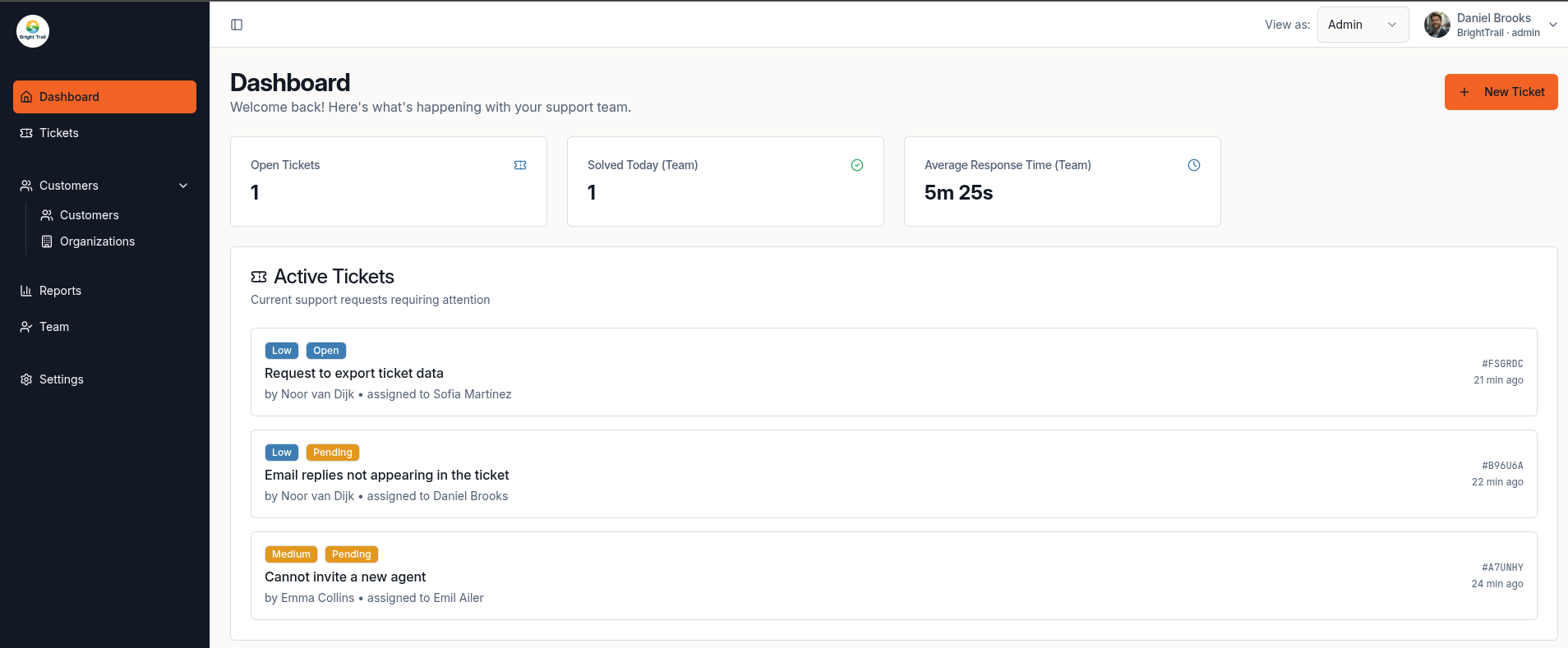
Real product view
A clearer queue after the shared inbox
A real Muninx dashboard view showing active tickets, response metrics, and workload visibility for teams moving beyond support@.
Comparison snapshot
This Move from shared inbox to help desk comparison focuses on what usually matters most to startups, small businesses, and lean support teams.
Comparison last reviewed on May 18, 2026.
Competitor pricing and feature information can change. Always verify details on the vendor's official website.
Note: comments about setup complexity and pricing predictability are practical inferences from the official plan structure, product packaging, and add-ons listed in the sources below.
| Category | Muninx | Shared inbox |
|---|---|---|
| Best for | Startups, agencies, SMBs, and lean support teams that want a focused ticket workflow with assignments, priorities, customer records, reporting, and optional AI-assisted replies. | Company addresses such as support@, info@, or front-desk mailboxes where multiple people need to read and send from the same mailbox. |
| Starting price | 1 human agent free forever. Extra human agents cost €9/agent/month. AI-assisted agents cost €17/agent/month. | Often included with an existing business email setup, but Microsoft notes that shared mailbox access requires licensed Exchange Online users and some shared-mailbox scenarios require additional licenses. |
| Ease of setup | Built for fast setup when a team wants to replace informal email handling with tickets, assignments, priorities, dashboards, and reports. | Usually easy to start if the team already uses Google's collaboration suite or Microsoft 365, but permissions, delegation, group settings, and account switching still need administration. |
| AI features | AI-assisted agents include AI draft replies, response improvements, and web search context. Human-only agents stay cheaper. | A shared inbox is primarily an email collaboration model. Gmail delegated accounts also list Smart Compose, Smart Reply, Gemini in Gmail, and several other features as unavailable to delegates. |
| Knowledge base | Muninx does not offer a knowledge base. | Shared inboxes do not provide a dedicated help-center knowledge base by themselves. Teams usually need a separate documentation or self-service tool if that becomes important. |
| Live chat | Muninx does not offer live chat. | Shared inboxes are email-first workflows. Gmail delegated accounts state that delegates cannot chat, and Microsoft shared mailboxes are described around shared email access. |
| Reporting | The reporting experience is the same across all tiers. The free human agent and paid human agents share the same standard reporting capabilities. | Google Collaborative Inbox supports assignment and completion states, but it is still an email/group workflow rather than a support reporting dashboard. Microsoft shared mailboxes focus on shared access and mailbox management. |
| Complexity | Lower operational complexity once several people need a real queue: tickets, priorities, assignments, customers, organizations, and reports live in one support workflow. | Low product complexity at first, but coordination can become harder as volume grows because responsibility, status, and follow-up often depend on email habits and permissions. |
| Pricing predictability | Straightforward: 1 free human agent forever, then fixed prices for human agents and AI-assisted agents. | Email costs may already be part of the team's collaboration plan, but limits and licensing can matter as usage grows, such as Microsoft shared mailbox storage and advanced-feature licensing. |
| Ideal team size | Best when more than one person handles support and the team needs clearer ownership, response visibility, and a workflow that can grow gradually. | Best for very small groups with simple shared email needs. Microsoft notes a shared mailbox supports a maximum of 25 users, with connection or duplicate-message issues possible when too many users access it at once. |
Want the simpler route?
Start free, review pricing, or jump back to the main product overview before you decide.
Compare other help desks too
Why teams look for a Shared inbox alternative
Buyers usually do not search for an alternative because a tool is bad. They search because their team size, budget, or support model calls for a simpler fit.
Ownership becomes unclear
Google Collaborative Inbox can assign conversations, but many teams start with plain shared email or delegation where ownership depends on habits, labels, or manual coordination. Once several people answer customers, a real ticket owner becomes more useful than inbox memory.
The inbox stops showing support health
A shared inbox can show messages, but it is not the same as a support dashboard. When leaders need response-time, resolution, priority, customer, and agent visibility, the team has moved beyond basic email collaboration.
Email permissions are not support operations
Delegation and shared mailboxes are useful ways to let multiple people read and send from one address. They do not automatically create a support operating model with ticket priorities, queue reporting, customer records, and AI-assisted drafting.
Why choose Muninx instead
Muninx is built for teams that want a help desk they can understand quickly and pay for predictably.
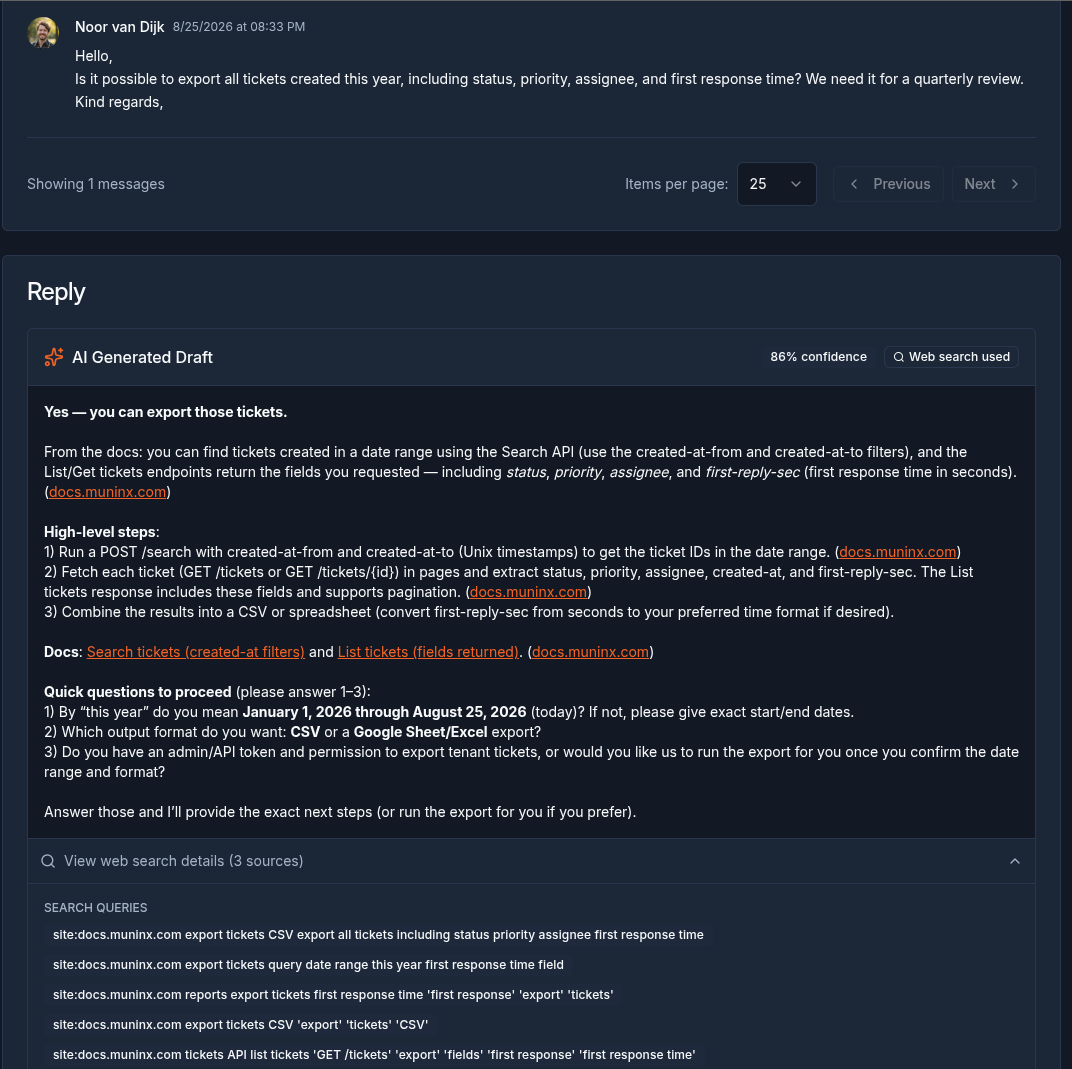
AI-assisted replies
Draft support replies without skipping human review
A real Muninx ticket view with an AI-generated draft reply for an AI-assisted agent. Human agents still decide what gets sent.
A cleaner step up from support@
Muninx turns incoming email into a support workflow with tickets, statuses, priorities, assignments, customer records, organization records, dashboards, and reports.
One free human agent stays free forever
Muninx includes 1 free human agent forever. That free human agent has the same standard capabilities as future paid human agents, so the first seat is not a reduced-capability tier.
Human and AI-assisted agents are easy to budget
Additional human agents cost €9 per agent per month. AI-assisted agents cost €17 per agent per month and include AI-assisted replies. The distinction is between standard human agents and AI-assisted agents.
AI help is available without removing review
AI-assisted agents can use AI draft replies, response improvements, and web search context while keeping the human agent in control of what gets sent.
You can review the public product overview on the features section or go straight to pricing if budget is the main deciding factor.
Who should choose Muninx
Startups and small businesses where more than one person now replies to customer emails.
Teams that need assignments, priorities, statuses, customer records, and reporting instead of relying on labels or inbox memory.
Support leads who want predictable pricing: 1 free human agent forever, €9 additional human agents, and €17 AI-assisted agents.
Teams that mainly need email-based ticketing today and do not require a knowledge base or live chat yet.
Who should choose Shared inbox instead
Support volume is still very low
A shared inbox can be enough when only one or two people handle occasional messages and the team does not need formal ownership, reporting, or priorities.
You only need shared email access
Choose a shared inbox when the actual requirement is simply letting multiple people read and send mail from one address, not running a support queue.
Google Collaborative Inbox already covers the workflow
If Google Groups assignment, completion, duplicate, and no-action-needed states are enough for your team, you may not need a dedicated help desk yet.
FAQ
Short answers for teams comparing Muninx and Shared inbox quickly.
Move from inbox habits to a support workflow
Start free with Muninx and give your team tickets, ownership, reporting, and optional AI-assisted replies when the shared inbox starts slowing everyone down.
We value your privacy
We use cookies to enhance your browsing experience and analyze our traffic. By clicking "Accept All", you consent to our use of cookies.