The simpler Zendesk alternative for small support teams
This Zendesk alternative page is for startups, small businesses, and lean support teams that want ticketing, reporting, and AI-assisted replies without enterprise-level overhead.
Quick answer
Muninx is best for
Small teams that want a fast setup, transparent pricing, one free human agent forever, and a clear split between human agents and AI-assisted agents.
Zendesk is best for
Teams that need a broader omnichannel suite, deeper enterprise controls, or a platform that can expand into more complex service operations.
Main tradeoff
Muninx keeps the buying decision simpler. Zendesk gives you a broader service platform, but its plan structure and paid add-ons can make setup and total cost heavier for a lean team.
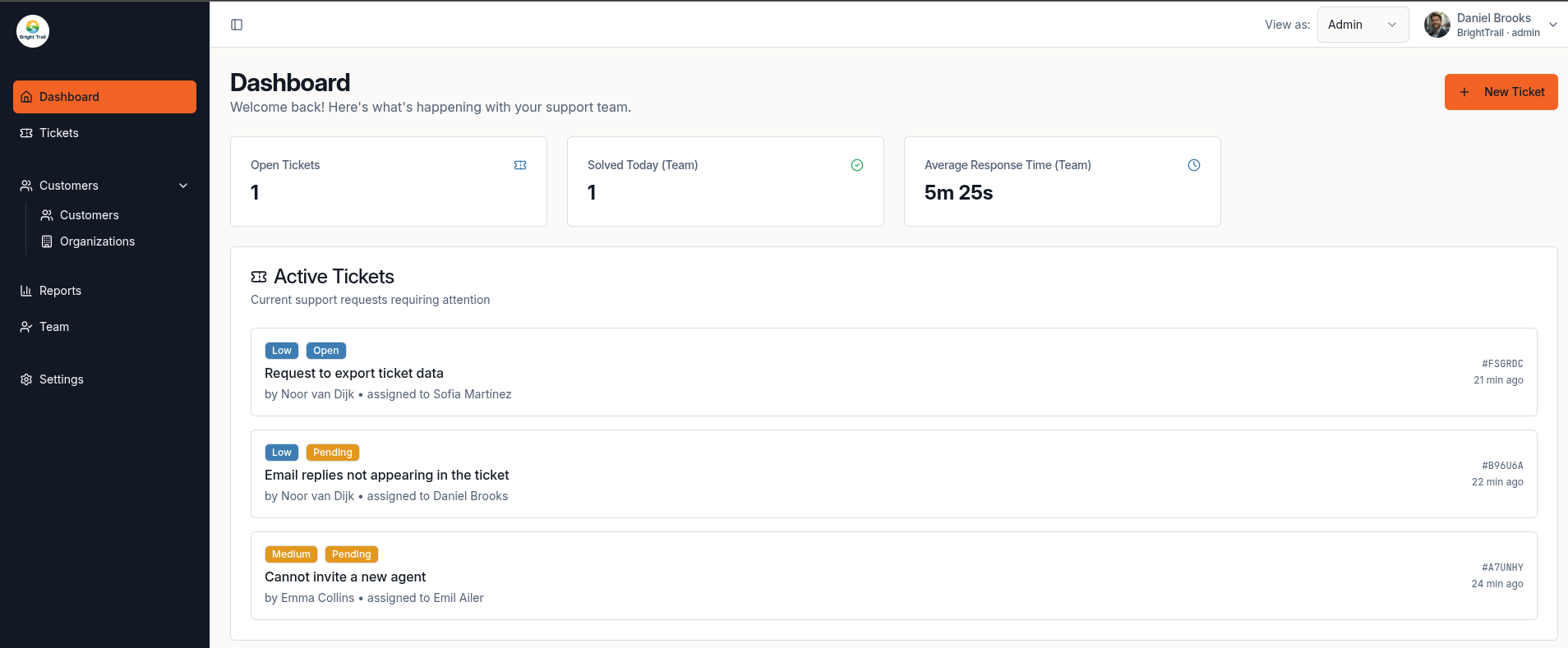
Real product view
Dashboard built for day-to-day support visibility
A real Muninx dashboard view showing active tickets, team response metrics, and a straightforward layout that suits smaller support operations.
Comparison snapshot
This Zendesk alternative comparison focuses on what usually matters most to startups, small businesses, and lean support teams.
Comparison last reviewed on March 28, 2026.
Competitor pricing and feature information can change. Always verify details on the vendor's official website.
Note: comments about setup complexity and pricing predictability are practical inferences from the official plan structure, product packaging, and add-ons listed in the sources below.
| Category | Muninx | Zendesk |
|---|---|---|
| Best for | Startups, small businesses, agencies, and lean support teams that want a practical help desk without a long onboarding curve. | Businesses supporting customers across multiple channels and teams that expect broader enterprise workflows over time. |
| Starting price | 1 human agent free forever. Extra human agents cost €9/agent/month. AI-assisted agents cost €17/agent/month. | Support Team starts at $19/agent/month billed annually. Suite + Copilot Professional is $155/agent/month and Enterprise is $209/agent/month billed annually. |
| Ease of setup | Positioned around a 2-minute setup and a lighter configuration burden for small teams. | Broader plan choices, channel configuration, and optional Help Center setup create more decisions before a team is fully configured. |
| AI features | AI-assisted agents include AI draft replies, response improvements, and web search context. Human-only agents stay cheaper. | Zendesk includes AI agents in Suite plans and sells Copilot separately for $50/agent/month billed annually or as part of Suite + Copilot bundles. |
| Knowledge base | Muninx does not offer a knowledge base. | Zendesk Knowledge is a dedicated help center and knowledge-base product with AI-assisted article workflows. |
| Live chat | Muninx does not offer live chat. | Zendesk Suite includes messaging with live chat capabilities as part of the broader suite. |
| Reporting | The reporting experience is the same across all tiers. The free human agent and paid human agents share the same reporting capabilities. | Zendesk Explore powers built-in dashboards, prebuilt reports, and broader analytics across channels, with some capability differences by plan. |
| Complexity | Lower product and pricing complexity for teams that mainly need a shared inbox replacement plus AI-assisted agent help. | Better suited when your support operation needs more channels, more admin controls, and enterprise-grade service design. |
| Pricing predictability | Straightforward: 1 free human agent forever, then fixed prices for human agents and AI-assisted agents. | Less predictable once you move beyond entry-level support and start layering Suite + Copilot bundles or add-ons such as Copilot, QA, WFM, privacy, or contact center. |
| Ideal team size | Best when a small or growing team wants simple tooling, a modern UI, and a budget that stays easy to explain. | A stronger fit for larger, multi-team, or more mature support operations that can justify broader platform scope. |
Want the simpler route?
Start free, review pricing, or jump back to the main product overview before you decide.
Compare other help desks too
Why teams look for a Zendesk alternative
Buyers usually do not search for an alternative because a tool is bad. They search because their team size, budget, or support model calls for a simpler fit.
The plan structure gets expensive faster
Zendesk's entry point can look manageable, but the pricing page also shows much higher Suite + Copilot bundles and separate paid add-ons. For a small team, that usually means the realistic cost depends on the exact workflow you need rather than one simple plan.
Smaller teams often do not need the full suite
Zendesk's own pricing FAQ positions Suite as an all-in-one, multi-channel solution with ticketing, messaging, help center, and voice. That breadth is useful when you need it, but it can be more system than a lean email-first support team wants to buy and manage.
There is more admin surface area to think through
Zendesk's help center needs to be enabled and activated, reporting capabilities vary by plan, and enterprise pages emphasize architecture, governance, integrations, and professional services. Those are strengths for larger operations, but they also signal a heavier setup footprint.
Why choose Muninx instead
Muninx is built for teams that want a help desk they can understand quickly and pay for predictably.
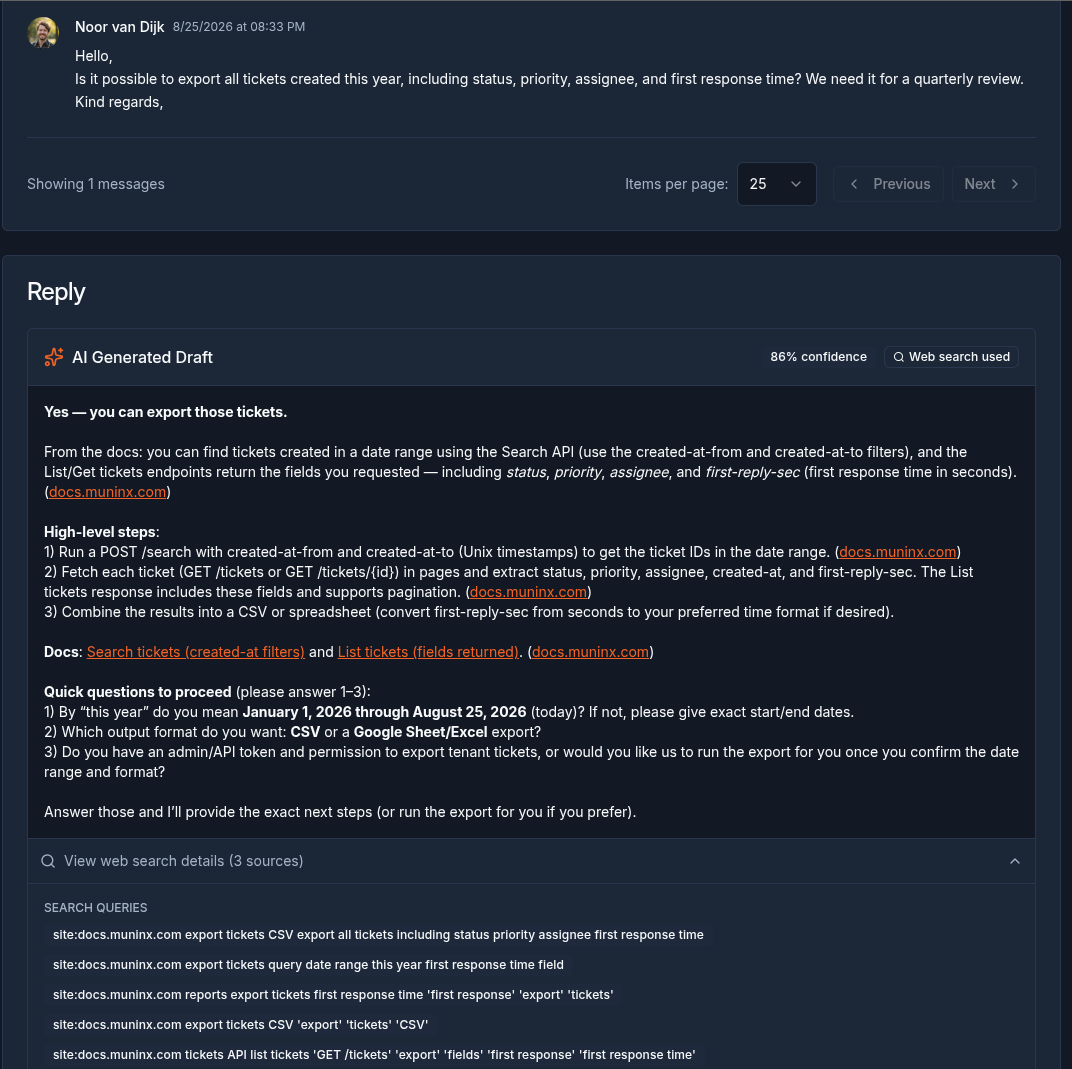
AI-assisted workflow
AI drafts that still keep the human agent in control
A real Muninx ticket view with an AI-generated draft reply. This is the product direction highlighted on the AI-assisted agent plan: AI helps the agent move faster, but the human still reviews and sends.
Pricing stays easy to explain
Muninx keeps the pricing model narrow: one human agent is free forever, extra human agents cost €9, and AI-assisted agents cost €17. The difference is AI assistance, not a separate stack of human-agent capabilities.
AI is tied to the agent plan, not a separate maze
If you want AI-assisted replies, you choose the AI-assisted agent tier. If you do not, your free human agent and any paid human agents still keep the standard product capabilities without paying for AI you are not using.
The product is positioned for fast onboarding
The current Muninx positioning leans into fast setup, a modern UI, clear reporting, and AI-assisted support instead of a broad enterprise platform narrative.
It fits the way lean teams usually buy software
Small teams normally want enough automation and reporting to stay organized without adding a long implementation cycle. That is the practical gap Muninx is targeting.
You can review the public product overview on the features section or go straight to pricing if budget is the main deciding factor.
Who should choose Muninx
Teams moving away from a shared inbox and into a proper ticket workflow without introducing enterprise-level admin overhead.
Startups and SMBs that want one free human agent forever, with the same standard capabilities as any future paid human agents.
Support leads who want AI-assisted replies for human agents but still want a simple per-agent cost model.
Teams that care more about straightforward setup and predictable pricing than about owning the broadest possible service suite.
Who should choose Zendesk instead
You need wider channel coverage now
Zendesk makes more sense if your near-term requirement includes a broader omnichannel setup with messaging, live chat, help center, and voice inside one service platform.
You need enterprise-grade analytics and controls
Zendesk is the stronger fit when your support org needs enterprise analytics, more advanced governance, heavier security requirements, or a platform that is designed to scale across multiple teams and regions.
You expect a larger implementation footprint
If your company is comfortable with professional services, broader configuration work, and a more customizable architecture, Zendesk gives you more room to build out a complex operation.
FAQ
Short answers for teams comparing Muninx and Zendesk quickly.
Choose the simpler help desk if that is what your team actually needs
Start free with Muninx, review the pricing, and compare it against the Zendesk path your team would realistically buy.
We value your privacy
We use cookies to enhance your browsing experience and analyze our traffic. By clicking "Accept All", you consent to our use of cookies.